A desktop app for learning Python, FastAPI and Django: 2300+ lessons with exercises. Python, a debugger and tests are built in, so you write and run code from the first lesson, with nothing to set up.
Windows + Linux
|
Python included
|
from $19
|
7-day refund
A minute with the app
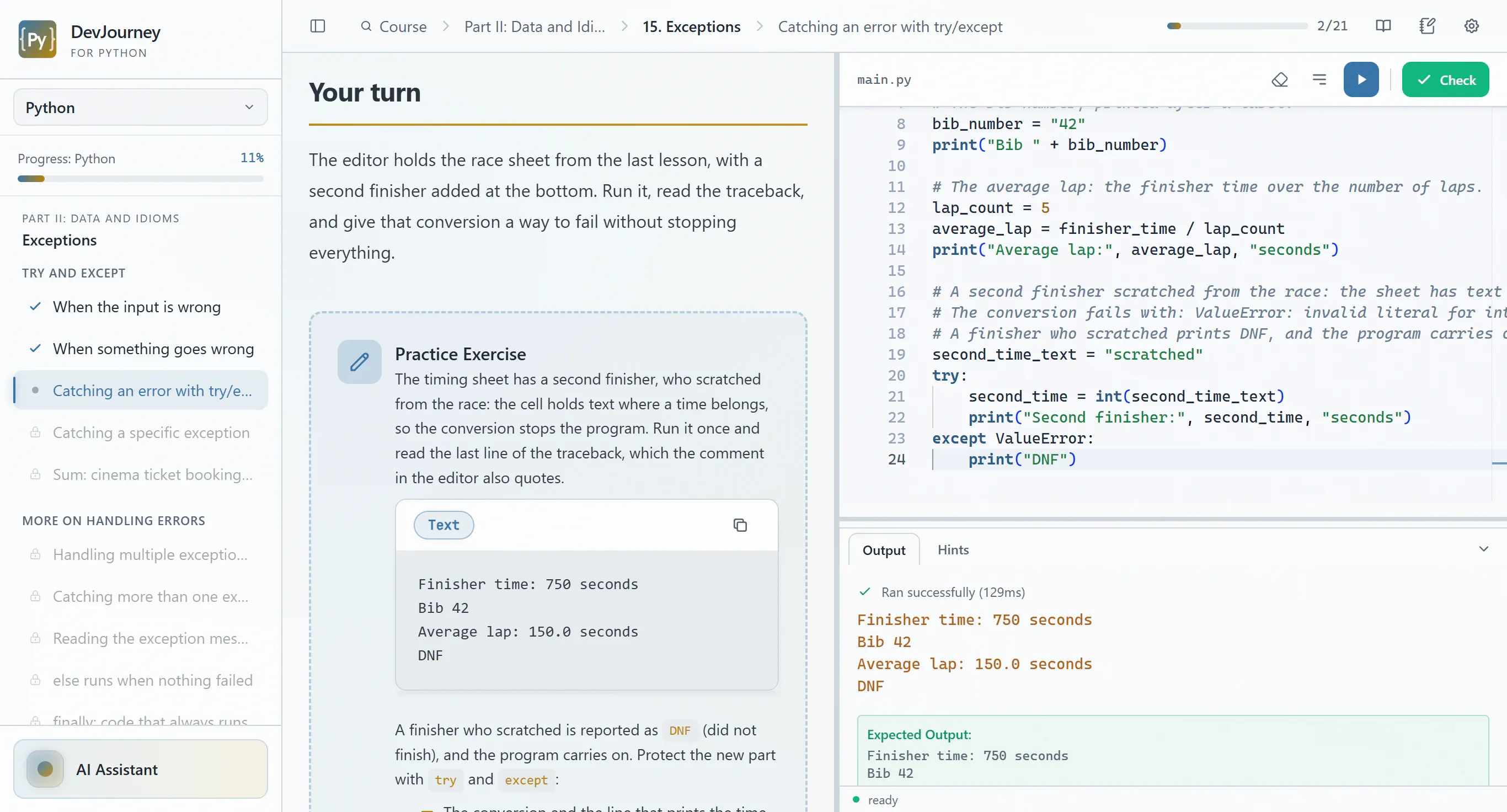
The program stops with a traceback. One fix later it runs and the check passes.
The app starts the server; you send a request from the HTTP client and read the JSON.
One test fails and says why. Fix the code, run again, all green.
Pause on a breakpoint, watch the variables change, step to the result.
Select a line, ask what it means, read the answer next to your code.
Who DevJourney is for
You don't need to know anything before the first lesson. Python ships inside the app, so you write and run code from lesson one.
You're starting from zero
You run your first Python program in the first lesson, with nothing to install. Lessons are short, each ends with an exercise, and the AI tutor explains errors in plain words.
Career change
One ordered path: from Python basics through web apps in FastAPI and Django to portfolio projects and job interview prep. Already know the basics? Start with the part that's new to you.
You're into tech and AI
You generate code with AI and want to actually understand it. You don't have to go in order: jump straight to asyncio, typing, FastAPI or Django. The AI tutor reads your code before it suggests anything.
One language, two frameworks
The Python course takes you from zero to code you can ship. After its Part V you know enough for either framework, which is where FastAPI and Django start. Each course is sold separately and ends with its own certificate, and all three live in one app, on that app's one licence key.
Python
1200+ lessons · 58 chapters · 7 projects
For you if you're starting from zero, or know Python only roughly and want to learn it properly.
Basics, data structures, OOP and type hints, pytest, asyncio, HTTP and SQL, then security, packaging, deployment and algorithms. A bonus interview-prep part closes it.
Inside the course
IBasics
IIData and Idioms
IIIOOP and Typing
IVTesting
VAdvanced Python → FastAPI / Django
VIProduction
VIIAlgorithms and Data Structures
VIIIInterview Prep
Certificate after Parts I–VII. Part VIII, interview prep, is a bonus.
No subscription, free updates to the courses you bought, lessons work offline
Nothing to install before the first lesson
Setting up Python is where a lot of people stall: which version, which installer, why pip put the package somewhere else. DevJourney for Python skips all of that. You install the app, and the next thing you do is write code.
Python 3.13 and uv in the installer
The interpreter, the uv package manager and the packages the lessons use, from pytest to FastAPI and Django, come with the app.
A virtual environment per package set
The app creates the environments itself, one for each set of packages a lesson needs, and reuses them. You never activate anything.
Your system Python is left alone
Already have Python or Anaconda? Nothing changes: the app keeps its interpreter and environments in its own folders.
Works offline
Lessons, tests and the debugger run without an internet connection. Only licence activation and the AI tutor go online.
What you don't have to type
$ winget install Python.Python.3.13
$ python -m venv .venv
$ .venv\Scripts\activate
$ pip install fastapi uvicorn pytest
$ pip install django djangorestframework
✓ Open the app, pick a lesson, write code.
Write, test and debug in one window
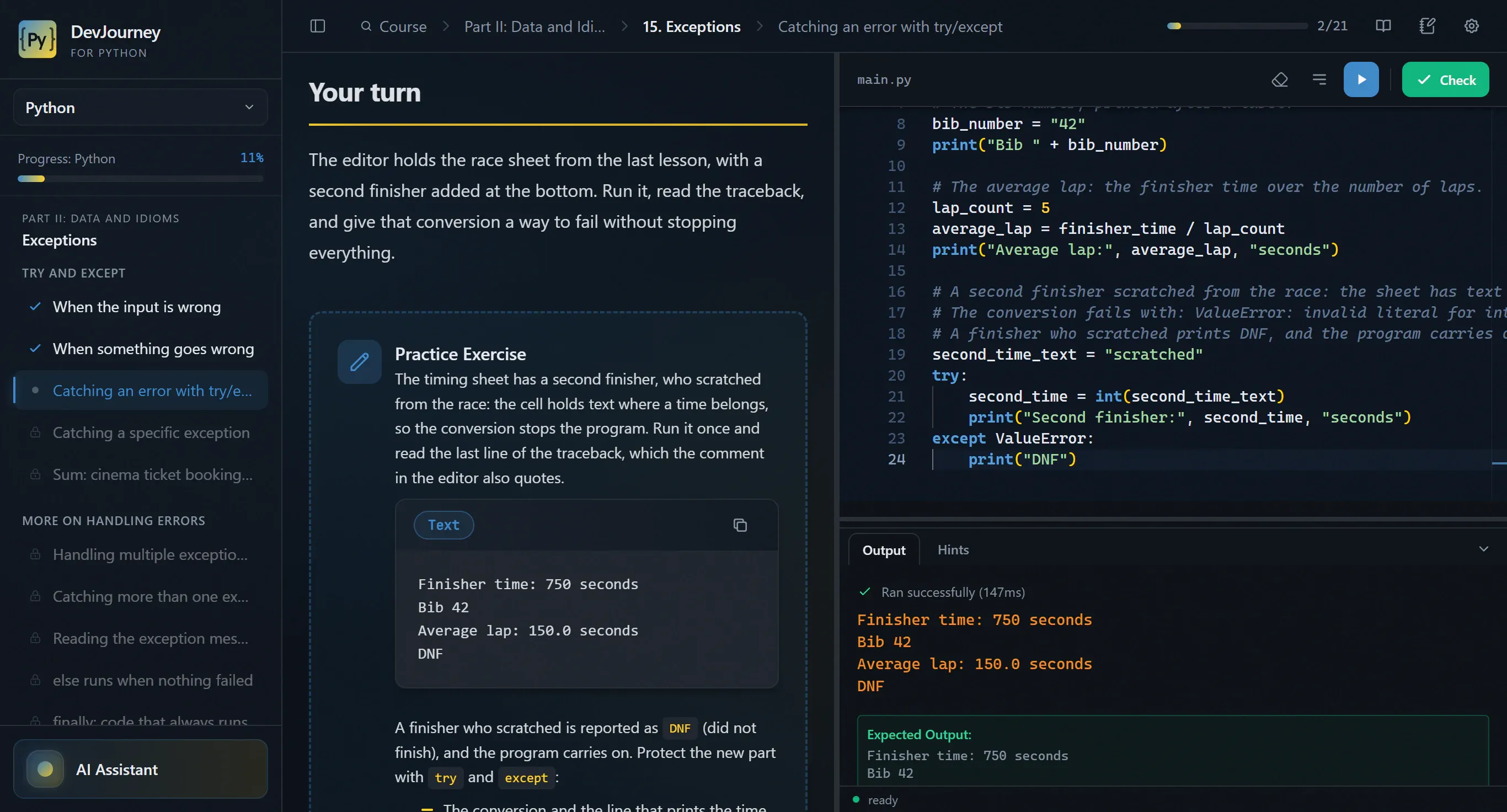
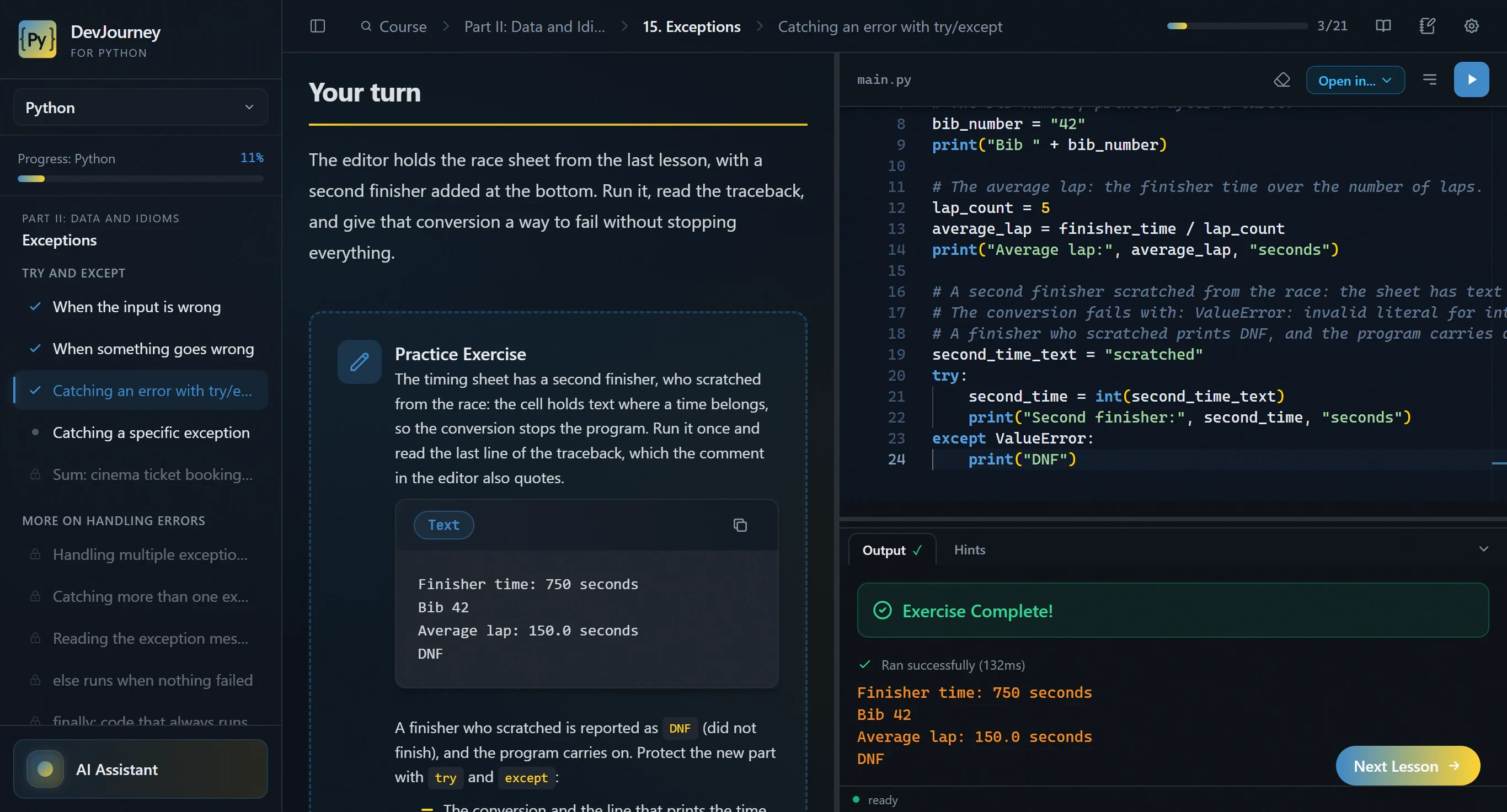
Everything a lesson needs runs on your computer: the interpreter, pytest, the debugger and the web server. Click through the demos; under each one is a screenshot of the app itself.
Pick a feature
DevJourney for Python · IntelliSense─ □ ✕
1classRectangle:
2: float = 0
3
4# hover the underlined names
5def(self, width: str) -> None:
6self.width =
Hover the underlined code
DevJourney for Python · python main.py─ □ ✕
1runner_name = "Maya"
2km_today = "8.6"
3total_km = km_today + 12.4
4
5print(runner_name)
6print(total_km)
OutputHints
Click Run to execute main.py
Click Run
DevJourney for Python · pytest─ □ ✕
1deftotal(prices: list[float]) -> float:
2subtotal = sum(prices)
3ifsubtotal > 100:
4returnsubtotal * 0.75# 10% off
5returnsubtotal
TestsHints
Click Run tests to start pytest
Run the tests
DevJourney for Python · Debug─ □ ✕
1orders = [5, 12, 8, 20, 3]
2shipped = 0
3
4forqty inorders:
5ifqty > 10:
6shipped += qty // 2
7else:
8shipped += qty
9
10print(f"Shipped: {shipped}")
OutputHintsDebug
Paused on breakpoint
orders=[5, 12, 8, 20, 3]list
shipped=5int
qty=12int
Click Step and watch the variables
DevJourney for Python · Python console─ □ ✕
Python 3.13 · variables stay between lines
>>> prices = [4.5, 12, 7.25]
Enter the next line
DevJourney for Python · main.py─ □ ✕
4/20Python 3.13
12# the weather station from the lesson
13station = WeatherStation()
14station.report_temperature()
Click Open in…
A tutor that reads your code first
Plug in the Claude Code or Codex CLI you already use. The tutor sees the lesson and your file, so you ask about your own bug, and it points the way instead of writing the solution.
Pick what to see
AI Assistant
Claude Code CLI
Send the question
DevJourney for Python · main.py─ □ ✕
1app = FastAPI()
2notes = ["buy milk"]
3# GET /notes returns the list
4
5deflist_notes():
6returnnotes
RequestHints
GET/notesSend
Click the highlighted line
Answers inside the lesson. The tutor's answer next to a selected fragment of a Python lesson
Web lessons with a server and an HTTP client
In FastAPI and Django lessons the app starts your server (uvicorn or runserver) and puts an HTTP client next to the editor. You send a request and see the status and the body, and Check sends the lesson's own requests to your server.
FastAPI. A FastAPI lesson: the server is running and the HTTP client shows the JSON response
Django. A Django lesson with the response from the app's server
Projects you build step by step
A project is one codebase you extend over several lessons, each step ending in a result you can see: a passing test, a response, a file on disk. Your files and progress survive switching lessons and closing the app.
Every project
Python
Cipher and password toolkit
Expense log
Multi-level parking garage
Async scraper CLI
Ship the station
Route planner
Mock interview
FastAPI
Flashcards API
Helpdesk API
The take-home API
Django
Flashcards
In the Python course. A project step in the Python course, with the project's files in the explorer
In FastAPI and Django. A step of the FastAPI flashcards project, with the project's files in the explorer
How a lesson helps you learn
Short lessons, one idea each, with a task at the end. When you get stuck there are hints in steps, quizzes check what you understood, and every term has a definition on hover.
Hints in steps. The hint ladder in a lesson, with two hints revealed
Quizzes. A quiz question answered, with its explanation
Glossary on hover. A glossary definition shown on hover in the lesson text
The Python course: 1200+ lessons
From your first program to code in production. Open a part to see its chapters.
Each course ends with a bonus part for the job interview: questions you answer in your own words, tasks against the clock and mock interviews. It doesn't count toward the certificate.
Open questions graded by the tutor You answer in your own words, and the tutor grades the answer against what the question was testing.
Mock interviews and a take-home A full mock interview in the Python course, and in FastAPI a take-home API built the way a recruitment task is.
Answer out loud Dictate your answers, as you would speak them in an interview. Whisper runs on your computer. Windows only.
Interview prep. An interview-prep lesson in the Python course
Yes, it's still worth learning to code.
AI writes plenty of Python. That made understanding the code worth more, not less. Three honest reasons:
AI produces a plausible answer in seconds. Deciding whether it's correct, secure and worth shipping is the job now, and that takes someone who reads code fluently.
02
When generated code breaks, understanding gets you out
Re-prompting a bad fix tends to add two new bugs. Reading the traceback and stepping through the debugger is how you get out of that loop.
03
Learn it yourself first, then let AI speed you up
Let AI think for you while you learn and you end up with a black box you can't debug. Build the model in your head by writing the code yourself, then hand the boring parts to the machine.
Python is in one IT job ad in five. You get paid for shipping a working system in it.
Five typical ads, assembled from requirements in real listings and median pay from reports on the Polish market. Open any of them to see what the job involves and how much of it you'll already know after the courses.
Python is the language named most often in IT job ads: 21.6% of listings in the first half of 2026, ahead of SQL (20.3%) and Java (16.1%). AI and automation drive the growth. On Just Join IT the Python category itself is 5.38% of listings, so in most ads Python is one requirement among others, for example in data, AI or testing. On average a junior ad gets 47 CVs, a mid one 24.
21.6%
of IT ads name Python (H1 2026)
5.38%
of Just Join IT listings are in the Python category (2025)
47
CVs per junior ad, average across IT
Sources: No Fluff Jobs, Career in IT 2026 (H1 2026 data), and Just Join IT, Salary Report 2026 (2025 data).
Example ads
Green: covered by the course. Grey: what the employer adds on top.
The companies in these ads don't exist, and the pay is a median from market reports, not a promise. That's also why there's no apply button: these are not openings.
The courses don't hand you a job. They give you the Python and web-backend part of these ads. The rest, such as Git, Docker, cloud, pandas or the AI layer, is in the grey chips, and you learn it separately.
Tools
Python 3.13 and uv in the installer — nothing to install separately
IntelliSense from basedpyright — completion, docs on hover, go to definition, rename and type errors as you type
Run with the full traceback — and Check to see whether the task is done
pytest — a report of passed and failed tests inside the app
Debugger (debugpy) — breakpoints, stepping, variables and watches, for scripts, tests and web servers
HTTP client — for the uvicorn and runserver servers your web lessons start
Scratchpad and Python console — your own code outside the lessons
Open in IDE — VS Code, Cursor, PyCharm or Zed, with pyproject.toml and .venv
AI tutor
Claude Code CLI or Codex CLI — the one you already use; DevJourney charges nothing for the tutor
It sees the context — the lesson, your code and the traceback
Hints, not solutions — it explains and points the way
Right-click menu — explain, what does this mean, help me debug
No provider at all — the app builds a ready prompt to paste into any chat
Courses
2300+ lessons in three courses — Python 1200+, FastAPI 630+, Django 500+
110 chapters — in a fixed order, each building on the ones before
11 projects — several files each, grown step by step
Hints in steps, quizzes and guided lessons
A glossary of 600+ terms — definitions on hover
Interview prep in every course — open questions graded by the tutor, mock interviews
English and Polish — written in both languages, not machine-translated
Web and testing
FastAPI — Pydantic v2, SQLAlchemy 2.0, Alembic, tokens and TestClient
FastAPI in production — configuration, observability, performance and deployment
Django — views, templates, forms, the ORM, migrations and the admin
Django REST Framework — serializers, viewsets, routers, API authentication and throttling
Testing — pytest, unittest, TestClient, the Django test client and pytest-django
Licence
One-time payment per course — no subscription
Bundles — Python with FastAPI or Django for $39, all three for $55
One key for every Python course you own — add another course later, on the same key
Free updates to the courses you bought — new lessons and fixes
A certificate per course — a PDF with your name, the date and a certificate number
7-day refund — no questions asked
One computer per key — move it to a new one yourself
The app
Windows 10/11 and Linux — AppImage, .deb or .rpm
Works offline — except licence activation and the AI tutor
Progress stays on your computer — in a local database
Your system Python is left alone — the app keeps its own interpreter and environments
Updates inside the app
Dark and light theme
Python's free material is excellent. Here's what it leaves to you.
The official tutorial and the FastAPI and Django docs are among the best there are, and they cost nothing. What they don't do is check your code, set one order across three topics or answer when you're stuck. Six questions worth asking of any way to learn.
Compare DevJourney with:
DevJourney for Python compared with other ways to learn Python
Criterion
DevJourney
Free courses and docs
Books
Online video courses
Learning apps
Bootcamps
Teaching yourself
DepthDepth
Three courses: from your first print() to a deployed FastAPI app, and Django from models to a REST API. The course doesn't stop at syntax: you get to testing, asyncio, databases and deployment, then on to FastAPI or Django. You practise every topic instead of just reading about it.
Very deep, especially the official documentation. The official docs and the best free courses go genuinely deep. What they lack are exercises that check whether you actually understand the topic.
Often very deep, but one topic per title. A good book goes just as deep, but getting from Python basics to FastAPI or Django takes several titles. Here the same depth is in one place.
Depends on the author, often an overview rather than depth. A video course often covers a topic in an hour and moves on. Here the same topic spans a dozen short lessons with exercises.
Bite-sized, usually syntax only. Learning apps teach syntax well but rarely go beyond it. DevJourney takes you further, all the way to an API and a web app with a database.
Broad and fast, little time to go deep. A bootcamp has to fit its curriculum into a fixed schedule, so many topics only get a mention. Here you can return to any lesson as often as you like.
As deep as you manage to dig. You can dig into anything on your own, but you don't know what you don't know yet. The course also covers topics you wouldn't think to search for.
Hands-onHands-on learning
You write, run, test and debug in every lesson, on the bundled Python. Every lesson ends in code you run and check. Python, pytest, a debugger and an HTTP client are built into the app, so there's nothing to install.
Some free courses have exercises; the docs leave the practice to you. Some free courses have exercises in the browser, but the docs only describe. Practice, setup and checking your results are left to you.
You read, and type the code in yourself. With a book you type the code into an editor and check it works yourself. In DevJourney the exercise sits next to the text, and checking it is one click.
Mostly watching video, exercises on the side. In a video course you mostly watch someone else write code. Here you write it yourself from the first lesson.
Exercises in the browser, in a simplified environment. Browser exercises run in a simplified environment. In DevJourney you run real Python, with tests and a debugger.
Live classes and group projects. Live classes and group projects are a bootcamp's real strength. But you practise when the class meets, not when you have time.
Professional tools, but nobody checks the result. You have professional tools, but nobody checks whether your solution is right. In DevJourney every exercise has tests that do.
AI mentorAI assistant as a mentor
Knows the lesson, your code and the traceback; explains instead of handing you the answer. Before it answers, the tutor reads the lesson, your file and the traceback. It explains the error and points the way instead of writing the code for you.
None, there are forums and Q&A sites. With free material you're left with forums and Q&A sites. Answers take time and don't know the exercise you're stuck on.
None, there's the errata and a forum. When you get stuck on a book, all you have is a search engine. In DevJourney you ask a tutor that sees this exact exercise and your code.
A Q&A tab for the author, answers take days. An answer from a course author usually takes days. The tutor in the app answers right away and knows the lesson you're on.
Sometimes an AI chat, usually blind to your code. The chat in a learning app usually can't see your code or the error. DevJourney's tutor gets both, along with the lesson itself.
A human mentor, but in class hours and shared by the group. A human mentor has real strengths, but also working hours and a whole group to look after. The AI tutor answers at midnight on a Sunday too.
A general chatbot that's happy to hand over the solution. A general chatbot will happily write the solution for you, and that's where the learning stops. DevJourney's tutor explains the error and nudges you instead of handing over the answer.
StructureStructure
One path: Python, then FastAPI or Django, each lesson building on the ones before. Lessons come in a set order and each builds on the ones before. After Part V of the Python course you pick FastAPI or Django and carry on with no gaps.
Each source has its own order, joining them up is your job. Docs, a tutorial and a free course each have their own order and assumptions. Turning them into one path is work you do yourself.
A coherent table of contents, but only within one book. A book has a coherent table of contents, but the next book starts somewhere else. Here three courses form one path.
Coherent within a course, gaps between different authors. One course can be coherent, but gaps open up between courses by different authors. In DevJourney, FastAPI and Django start exactly where Part V of the Python course ends.
There's a path, but it stops at the basics. Apps have a path, but it usually ends at the basics. Here it leads all the way to a deployed web app.
A curriculum planned for the whole cohort. A bootcamp curriculum is well ordered, but paced for the whole group. Here it's the same order at your pace.
You pick the order, the gaps show up later. You choose the order yourself, and the gaps only show up in your first bigger project. The course is laid out so there aren't any.
PricePrice
$19 per course or $55 for all three, paid once. You pay once, with no subscription or renewals, and you can try some lessons free before you buy. You also get 7 days to ask for a refund, no questions asked.
Free. It costs nothing, and that's a real advantage. You pay in time instead: finding material, putting it in order and checking yourself.
Cheap per title, but you need several. One book is cheap, but getting from the basics to FastAPI or Django takes several. A DevJourney course costs about as much as one or two.
Cheap on sale, but you pay per course or by subscription. Video courses are cheap on sale, but you pay for each one or for a subscription. Here you pay once and get updates to the courses you bought at no extra cost.
Monthly or yearly subscription. Learning apps usually charge a subscription for as long as you're learning. DevJourney is a one-time purchase.
The most expensive option, usually thousands of dollars. A bootcamp usually costs thousands. All three DevJourney courses are a fraction of that.
Free, you pay with your time. Teaching yourself costs nothing but time. The course saves you that time, because you never have to work out what comes next.
Up to dateUp to date
Python 3.13, Pydantic v2 and SQLAlchemy 2.0, with updates to the courses you own at no extra cost. The courses target Python 3.13, Pydantic v2 and SQLAlchemy 2.0. When libraries change, the lessons get updates at no extra cost.
The official docs are always current. The official docs always describe the current version, and that's their edge. Free tutorials are another story: many still teach old APIs.
Editions age, and libraries like Pydantic and SQLAlchemy change between major versions. A book starts ageing the day it's published, and Pydantic and SQLAlchemy changed a lot between major versions. Here the lessons get updated.
Depends on whether the author still updates it. How current a course is depends on whether its author still maintains it. Many popular courses still teach Pydantic v1.
Usually current, since they mostly teach basics. Apps are usually current because they teach basics that don't change. The trouble starts with frameworks, which they rarely reach.
Curriculum refreshed before each cohort. Bootcamps refresh their curriculum before each cohort, which is a strength. But the updates don't reach you once your cohort ends.
The docs are current, search-engine tutorials often aren't. The docs are current, but tutorials from a search often aren't, and that's hard to tell at a glance. In a course you don't have to check.
Yes
Partly
No
Buy one course, or a bundle
You pay once, with no subscription. Each course has its own certificate, every Python course you buy goes on one key, and a bundle costs less than its courses bought one by one. Other DevJourney apps have their own keys.
Windows 10 and 11, and Linux on x86_64 as an AppImage, a .deb or an .rpm.
No. Python 3.13 and the uv package manager are part of the installer, together with the packages the lessons use (pytest, FastAPI, Django and the rest). The app creates the virtual environments itself.
No. The app uses its own interpreter and keeps its environments in its own folders, so your system Python and your Anaconda environments stay as they are. When you open a lesson in your editor, it gets its own .venv.
If you're starting from zero or know Python only roughly, start with the Python course. FastAPI and Django assume what its Parts I–V teach: classes, type hints, tests and asyncio. If you already know that, go straight to a framework.
FastAPI is a lightweight framework for APIs: routes, Pydantic models and dependency injection, with the database and the rest added by you. Django comes with more built in: the ORM, the admin, forms and templates, and you build APIs in it with Django REST Framework. Want only a backend for a frontend or a mobile app? FastAPI. Want whole web applications with pages and a back office? Django. The courses are independent, so you can take both.
No. There's no pandas, NumPy, Jupyter or machine learning here. The courses teach Python as a programming language and for web backends: tests, databases, APIs and deployment.
Yes. Python costs $29, FastAPI and Django $19 each. If you own one, you can buy another later with the same email address and it goes on the same key.
Yes. Python with FastAPI or Python with Django costs $39, all three courses $55. Each bundle costs less than its courses bought separately.
DevJourney charges nothing for the tutor. You plug in what you already use: Claude Code CLI or OpenAI's Codex CLI, and any cost on the provider's side depends on your plan. You can also connect nothing at all: the app builds a ready prompt with the lesson's context to paste into any chat.
Yes. Open a finished lesson, a project or a note in VS Code, Cursor, PyCharm or Zed. The app writes the files with a ready pyproject.toml and builds a .venv with the packages the lesson uses, so the code runs straight away.
A 64-bit Windows 10 or 11, or Linux on x86_64. The installer weighs a few hundred megabytes, because Python, uv, the language server, the debugger and the lesson packages are inside it. After that, lessons work without an internet connection.
The installer isn't code-signed yet, so on first run Windows shows "Windows protected your PC". Click "More info" and then "Run anyway". The download dialog shows the file's SHA-256 checksum and a link to its VirusTotal scan, so you can check that what you downloaded is the published file.
A key is active on one computer at a time. You can deactivate it on the old one and activate it on a new one yourself, without contacting support.
Yes, one for each course, once you finish its lessons. The interview-prep parts are a bonus and don't count toward it. The certificate is a PDF with your name, the completion date and a certificate number.
You pay once per course or bundle, with no subscription. A course you bought stays yours, and free updates cover new lessons and fixes in the courses you own. Payments go through Dodo Payments, which also handles VAT.
7 days from purchase, no questions asked. Email me and you get a full refund.
This site uses Google Analytics and Google Ads cookies to understand how visitors find and use it, and to measure whether our ads work. They only run if you say yes. Privacy Policy