Learn C# and ASP.NET Core in a full development environment.
Two courses in one desktop app, over 1300 lessons. The compiler, debugger and Kestrel server run on your machine, and the AI tutor reads your code first.
from $29 per course Windows / Linux New 7-day refund
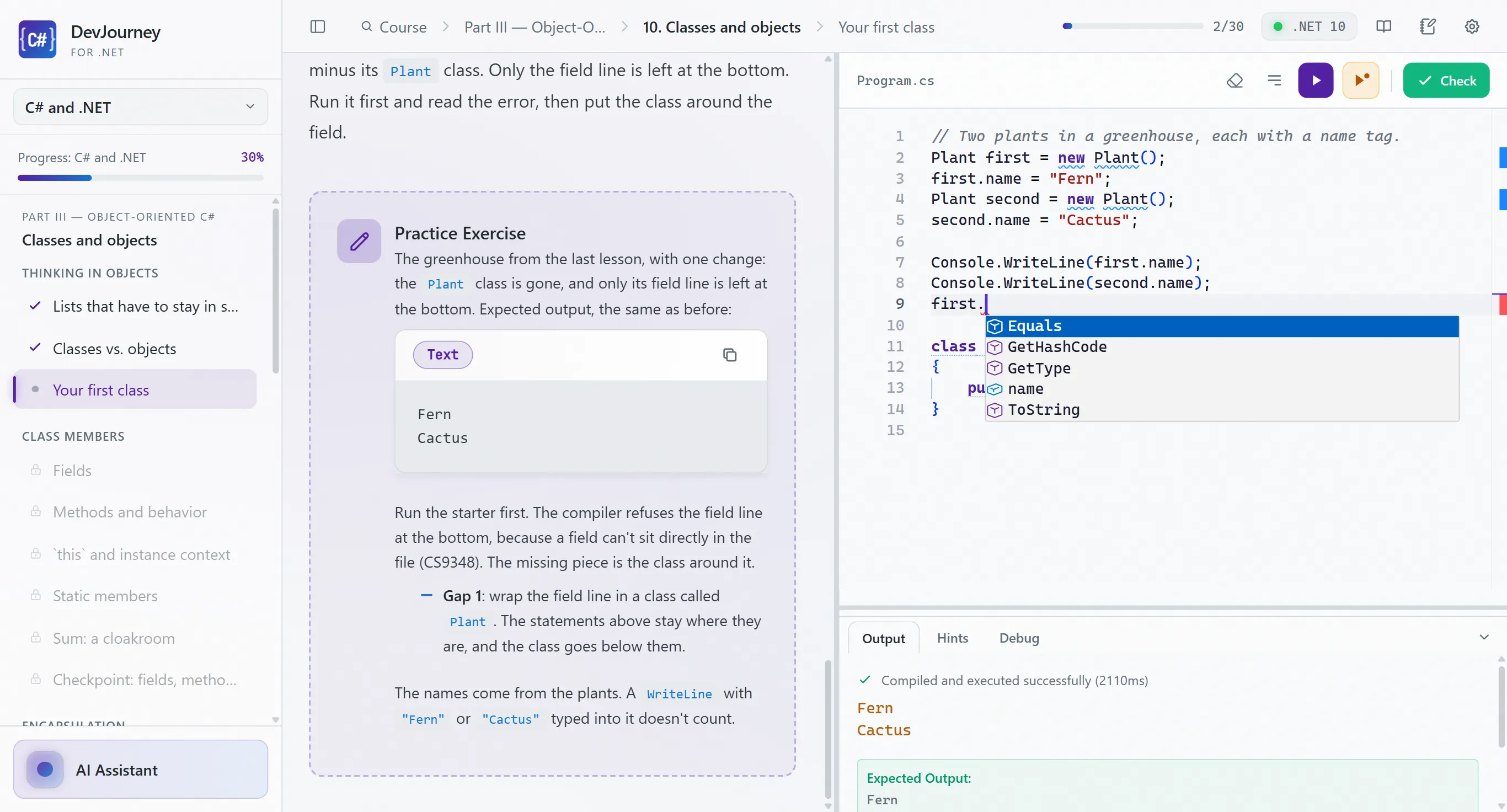
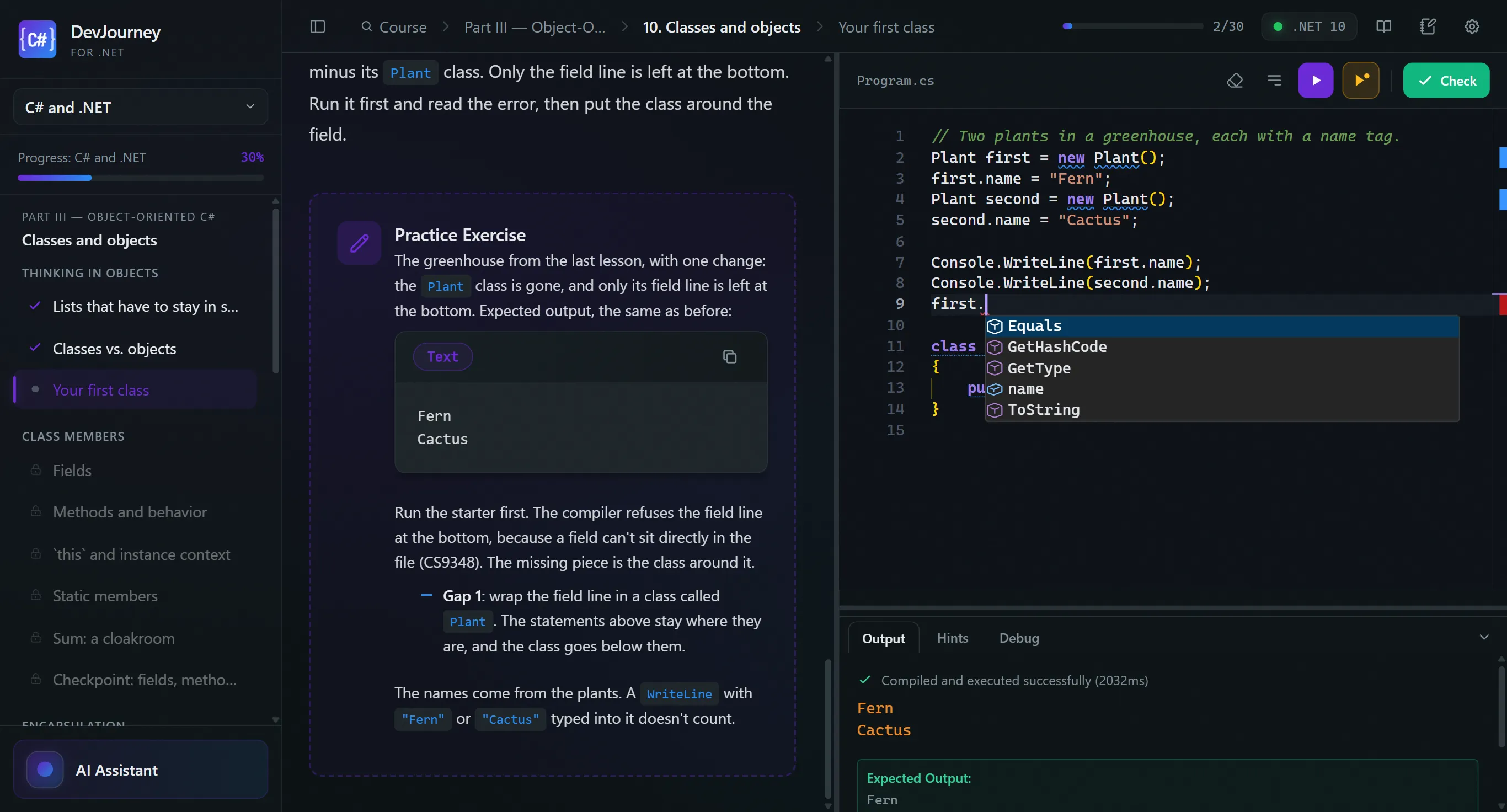
A minute with the app
Run compiles your code with your local .NET SDK. You get the full compiler error, fix it with IntelliSense, and Check passes the exercise.
The program stops on a breakpoint inside the loop. You add an expression to Watch, step through, and watch best and i change.
Select part of the lesson, right-click and ask. The AI tutor answers in place, no switching to a chat window.
Who DevJourney is for
You don't need to know anything before the first lesson. You need to want to write code yourself, not just watch it being written.
-
You're starting from zero
You run your first C# program in the very first lesson. Lessons are short, each ends with an exercise, and the AI tutor explains compiler errors in plain words.
-
Career change
One ordered path: from C# basics through Web APIs in ASP.NET Core to portfolio projects and job interview prep. Already know the basics? Start with the part that's new to you.
-
You're into tech and AI
You generate code with AI and want to actually understand it. You don't have to go in order: jump straight to async, LINQ, EF Core, testing or security. The AI tutor reads your code before it suggests anything.
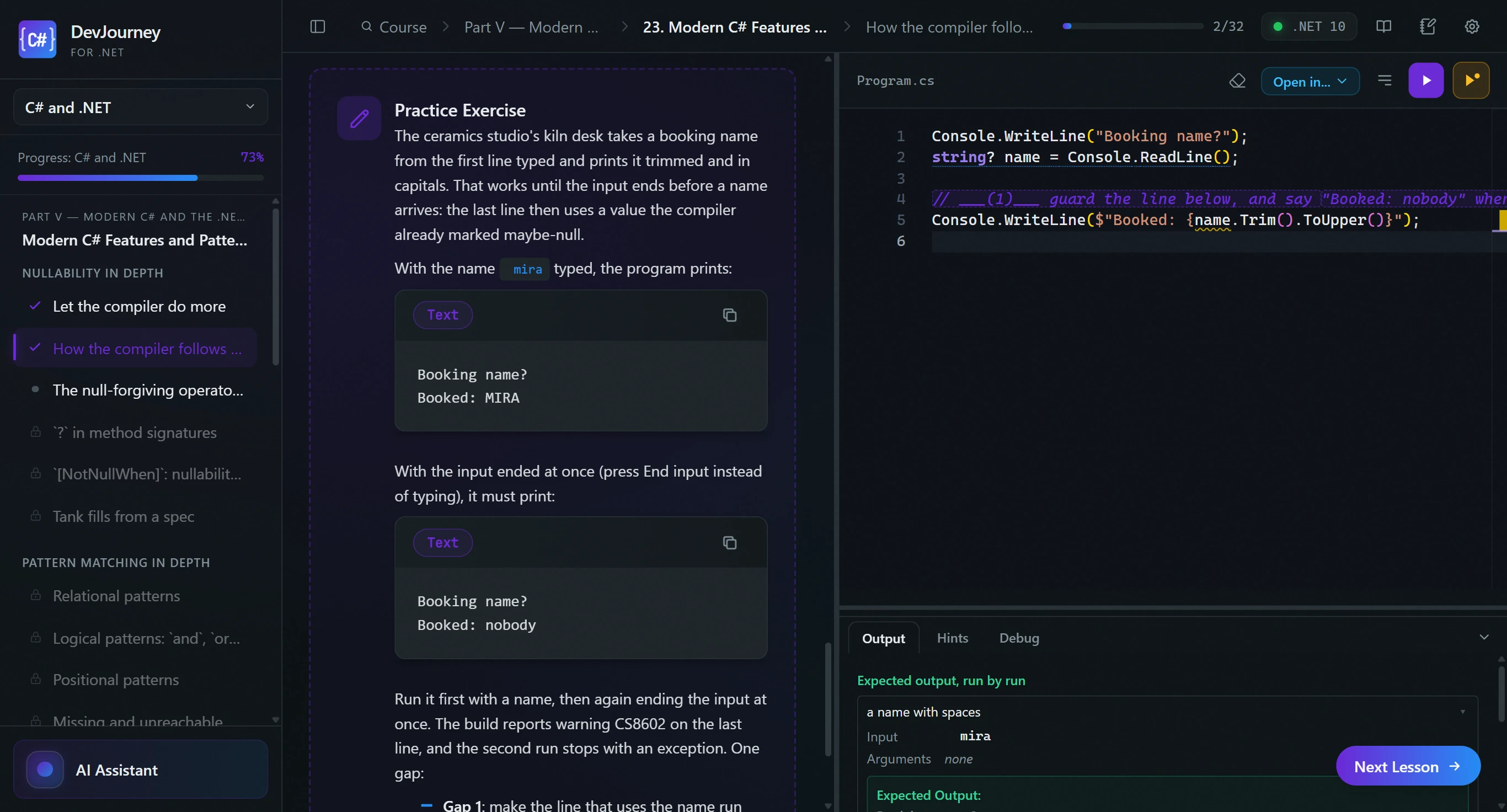
Two courses. One app.
Buy one course or both as a bundle. Your key unlocks what you bought, you switch courses in the sidebar, and each one ends with its own certificate.
-
C# and .NET
Parts I–V
From your first program through object-oriented programming, LINQ and async to xUnit testing. For starting from zero, or for finally learning the language properly.
- lessons
- 630+ lessons
- chapters
- 29 chapters
- projects
- 6 projects
- hours of material
- about 80 hours of material
Certificate after completing Parts I–V
-
ASP.NET Core
Parts VI–X
EF Core, Web APIs, authentication and authorization, integration testing, security, deployment and Razor Pages. It closes with an interview-prep track.
- lessons
- 700+ lessons
- chapters
- 35 chapters
- projects
- 5 projects
- hours of material
- about 95 hours of material
Certificate after completing Parts VI–IX.
Have version 1.x? Your key unlocks both courses.
Compare pricesPay once. It's yours forever.
One-time license, free updates to the courses you bought, lessons and compiler work offline
Editor, debugger, and compiler: the tools you'll use at work.
Microsoft's Roslyn, the C# engine in Visual Studio and VS Code, plus your local .NET SDK. Errors appear as you type; Run compiles on your machine.
Pick a feature
Hover the underlined code
More on the blog: C# debugging: when printing stops paying off
An AI tutor that sees your code. Plug in what you already use.
The tutor runs through Claude Code CLI or Codex CLI, running locally on your machine. Before it answers, it gets the lesson, your file and the compiler error. No provider? The app turns that into a ready prompt for any chat.
Pick what to see
AI Assistant
☁ GPT-5.4 Mini
Send the question
Your API is running before you finish the lesson.
Web lessons start a Kestrel server on your machine. You send requests from the built-in HTTP client, watch the logs live, and Check calls your running API and grades the responses.
- Kestrel on your machine Start runs your ASP.NET Core app locally, with live logs. No emulator and no cloud.
- Built-in HTTP client Method, URL, headers and a JSON body. The response and its status code show up next to your code, no Postman or curl needed.
- Checked against a live API Check sends requests to your app and compares the responses. What passes is a working API, not code that merely looks right.
- EF Core migrations and dotnet watch Run dotnet ef migrations and dotnet watch from inside the app. The schema grows with your code, and changes reload on their own.
11 projects that grow with you.
Most parts end with a project: from a console word counter, through a LINQ sales report, to an EF Core forum and TaskTracker in Razor Pages. You work across files and multi-project solutions, and your edits, snapshots and tests persist between sessions.
Every project
C# and .NET
- Word Frequency CLI
- Mini Library
- Sales Report (LINQ)
- Mini Pub/Sub
- Markdown → HTML
- TDD String Utils
ASP.NET Core
- Forum Threads
- TaskTracker
- TaskTracker in production
- The Take-Home API
- The Refactoring Take-Home
Step by step, with a hint when you need one.
Guided lessons split a new topic into small steps. The hint ladder nudges first and shows the solution last. What code hides, like DI service lifetimes or thread states, you watch in interactive visualizers.
1300+ lessons. 64 chapters. Two courses.
C# and .NET: from Console.WriteLine through OOP, LINQ and async to xUnit tests. ASP.NET Core: EF Core, Web APIs, authentication, integration tests, security and deployment, ending with Razor Pages and the TaskTracker project.
C# and .NET
ASP.NET Core
C# and .NET
Parts I–V · 630+ lessons · 29 chapters
- What Is Programming?
- Meet C# and .NET
- Your First Program
- Values, types, and variables
- Operators, strings, and expressions
- Control flow
- Methods
- Collections basics and error handling
- Project: Word Frequency CLIproject
- Classes and objects
- Inheritance and polymorphism
- Interfaces and abstract types
- Structs, records, and enums
- Organizing code: files and namespaces
- Project: Mini Libraryproject
- Generics
- Collections deep dive
- Delegates, lambdas, and events
- LINQ
- Project: Sales Report (LINQ)project
- Asynchronous programming
- Project: Mini Pub/Subproject
- Modern C# Features and Patterns
- Projects, Packages, and Tooling
- Files, Streams, and Serialization
- Application Building Blocks
- Unit Testing with xUnit
- Project: Markdown → HTMLproject
- Project: TDD String Utilsproject
Certificate after completing Parts I–V
ASP.NET Core
Parts VI–X · 700+ lessons · 35 chapters
- Database fundamentals
- EF Core Foundations
- Modeling data and migrations
- Advanced data access
- Saving, transactions, and performance
- Project: Forum Threadsproject
- Introduction to Web Development
- Your first ASP.NET Core API
- Your First Web API
- Routing and Middleware
- Minimal APIs and Controllers
- Binding, Validation, and Content
- Consuming HTTP APIs
- Authentication
- Authorization
- Cross-Cutting Concerns
- Documentation, Versioning, and Real-Time
- Integration Testing
- Debugging and Performance
- Security Essentials
- Deployment and Operations
- Application Architecture
- Razor Pages
- Project: TaskTrackerproject
- Project: TaskTracker in productionproject
Project: TaskTracker
A task-management web app: ASP.NET Core Razor Pages + EF Core + SQLite, with an xUnit test suite. You edit many files at once, check the endpoints with the built-in HTTP client, and finish by getting the app ready for production.
- Interview Process and Behavioral
- C# and .NET Recall
- OOP, SOLID, and Patterns
- Data Structures and Algorithms
- Async, Concurrency, and Performance
- Data, SQL, and the Web Stack
- Live Coding and System Design
- Project: The Take-Home APIproject
- Project: The Refactoring Take-Homeproject
- Mock Interviews
Certificate after completing Parts VI–IX.
Rehearse the interview before the real one.
Part X of the ASP.NET Core course prepares you for hiring. You answer 170 open questions in your own words, and the AI tutor grades them and says what was missing. Plus coding challenges, two timed take-home projects and a readiness card listing topics to revisit.
- 170 open questions You write the answer as you would in the interview, and the AI grades it and points out what's missing. No picking one of four options.
- Readiness card Your first-attempt scores by topic, with a list of lessons to revisit.
- Take-home projects An API to write from scratch and a legacy refactor, both against the clock.
- Dictation (Windows) Say your answer out loud. Whisper transcribes it locally, offline.
Yes, it's still worth learning to code.
If AI writes so much code, why learn it yourself? Because AI raised the value of understanding code rather than lowering it. Five honest reasons:
Further reading: The 70% problem (Osmani) / How I use LLMs (Willison)
-
You can't review what you can't read
AI produces a plausible answer in seconds. Deciding whether it's correct, secure, and worth shipping is the job now, and that takes someone who reads code fluently.
-
When generated code breaks, understanding gets you out
Re-prompting a bad fix tends to add two new bugs. Reading a stack trace and stepping through a debugger is how you break out of the loop.
-
AI extends the programmer, it doesn't replace one
It multiplies the output of someone who knows what they're doing. It can't supply the judgment from nothing; experienced instincts are exactly what pull the best results out of it.
-
Fundamentals are the moat now
Once AI commoditizes the obvious code, your edge is what it's bad at: architecture, data modeling, performance, security, tradeoffs. That knowledge is worth more, not less.
-
Learn it yourself first, then let AI accelerate you
Let AI do your thinking while you learn and you end up with a black box you can't debug. Build the mental model by writing the code yourself, then hand the boring parts to the machine.
More on the blog: Is learning to code still worth it when AI writes code
AI writes the code. Knowing whether it's any good is what gets paid.
Five typical job ads, built from requirements in actual postings and published salary data. Open one to see what the work involves and how much of it you'll have after this course.
These are US figures from Built In's self-reported data, which leans toward funded tech companies in expensive metros, so read them as the upper half of the market rather than the middle. What holds everywhere: back-end work is the largest slice of the market, it pays above the general developer average, and the ads here are what it looks like from the inside.
- $144K
- median software developer base pay, US
- $183K
- median back-end developer base pay
- $155K
- median ML engineer base pay
Source: Built In, US tech salaries 2026. Self-reported base pay, equity excluded.
Example ads
Green: covered by the course. Grey: what the employer adds on top.
The companies in these ads don't exist, and the pay is a median from market reports, not a promise. That's also why there's no apply button: these are not openings.
The course doesn't hand you a job. It gives you what these ads ask for. The portfolio, the CV and the interviews are your half of the road, and you walk in with something concrete.
More on the blog: Career change to programming: a plan that fits a real week
Editor and tooling
- Monaco editor — the same editor core VS Code runs on
- Roslyn IntelliSense — completions, hover docs, signature help, go-to-definition
- Compiler diagnostics as you type, with quick fixes and formatting
- Your own .NET SDK compiles the code — no sandbox, no cloud runner
- Step debugger — breakpoints, step into, step over, step out
- Locals, Watch and Call Stack panels, plus conditional breakpoints
- The debugger on hands-on lessons — from chapter 8 to the end of the course
- Open in IDE — VS Code, Visual Studio, Rider or Zed, in one click
AI tutor
- Claude Code CLI or Codex CLI — run locally, as a subprocess
- Works with no provider connected, too — the app builds a ready prompt to paste into any chat
- Reads the lesson, your file and the compiler error before it answers
- Explain, Debug and Hint buttons, plus a menu on any code you select
- Explains the mistake instead of pasting the answer
- Grades answers to open questions — in the interview-prep track
The course
- 1300+ lessons across 64 chapters — two courses: C# and .NET, and ASP.NET Core
- From Console.WriteLine to ASP.NET Core Web APIs and Razor Pages, on .NET 10 and EF Core 10
- Exercises graded against program output, not a checkbox
- Guided lessons that walk one step at a time
- Quizzes, concept lessons, 14 interactive visualizers and Mermaid diagrams
- A hint ladder — a nudge first, the solution last
- A glossary of 500+ terms — hover a term for its definition; the app marks the ones you've met
- The whole course in English and Polish, switched inside the app
Project work
- 11 projects — from a console tool to TaskTracker on Razor Pages + EF Core + SQLite
- A multi-file project explorer — solutions with several projects, and snapshots you can restore
- xUnit suites — the tests passing is the grade, and the report shows which one fails
- Built-in HTTP client — call your own API without leaving the window
- Web lessons boot a Kestrel server — checking an exercise replays requests against your API
- dotnet ef migrations and dotnet watch, run from inside the app
- Scratchpad with six starters — console, LINQ, async, xUnit, EF Core, Minimal API
- Interview prep — 170 open questions graded by AI, a readiness card and two timed take-home projects
What you own
- One payment per course — no subscription, no seats, no renewal
- Free updates to the courses you bought — new lessons and fixes
- 7 days to get your money back, no questions
- One machine, moved by you — deactivate here, activate there
- Lessons and NuGet packages ship inside the app — exercises compile with nothing to download
- The app works offline — the licence is checked periodically
- A completion certificate for each course — a PDF with your name, the date and a certificate number
- Over 70 free lessons — from both courses, with no tools held back
The app
- Windows 10/11 and Linux desktop app that updates itself
- Keyboard shortcuts throughout, and a Ctrl+P file switcher in project work
- Light and dark themes, or follow the system
- Resizable panels — lesson, editor, output and AI, sized how you want them
- Progress kept in a local SQLite file on your own disk
- A course switcher in the sidebar — one app, both courses
- Dictated answers — local Whisper, offline, Windows only for now
Every other route asks you to give something up
A book goes deep but never checks your code. A bootcamp checks it, for a few thousand dollars. Here are six questions worth asking of any way to learn programming.
Compare DevJourney with:
| Criterion | DevJourney | Books | Online video courses | Learning apps | Bootcamps | Teaching yourself |
|---|---|---|---|---|---|---|
| Depth Depth | 1300+ lessons, from your first line of C# to deploying an ASP.NET Core app. The course doesn't stop at syntax: it takes you through EF Core, authentication, integration testing and deployment. You practise every one of those topics instead of just reading about it. | Often very deep, but one topic per title. A good book goes just as deep, but getting from C# to ASP.NET Core takes several titles. DevJourney puts the same depth in one place and has you practise it straight away. | Depends on the author, often an overview rather than depth. A video course often covers a topic in an hour and moves on. Here the same topic is spread over a dozen or more lessons with exercises. | Bite-sized, usually syntax only. Learning apps teach syntax well but rarely go past it. DevJourney keeps going, all the way to a web app with a database. | Broad and fast, little time to go deep. A bootcamp has to fit its curriculum into a fixed schedule, so plenty of topics only get a mention. Here you go at your own pace and revisit a lesson as often as you like. | As deep as you manage to dig. On your own it's easy to stop at whatever already works. The course also walks you through topics you wouldn't go looking for, like testing and security. |
| Hands-on Hands-on learning | You write, compile and debug in every lesson, on your own .NET SDK. An exercise only passes when the program prints the right output or the tests go green. Your own .NET SDK compiles the code, in an editor with IntelliSense and a debugger. | You read, and type the code in yourself. With a book you copy the example into an IDE and judge for yourself whether it worked. In DevJourney the exercise sits next to the text and the app checks the result. | Mostly watching video, exercises on the side. Watching someone else write code makes you feel you understand it. Here you write it yourself in every lesson, so you see right away what you can't do yet. | Exercises in the browser, in a simplified environment. A browser exercise teaches you to write code in a box, not in a project. DevJourney runs dotnet build, xUnit tests and a Kestrel server. | Live classes and group projects. A bootcamp is hands-on too, but classes run on a timetable. In DevJourney you practise whenever you like, and checking an exercise doesn't wait for an instructor. | Professional tools, but nobody checks the result. On your own you use professional tools, but nobody tells you whether the solution is right. Here every exercise has a check and a ladder of hints. |
| AI mentor AI assistant as a mentor | Knows the lesson, your code and the compiler error; explains instead of handing you the answer. Before it answers, the tutor reads the lesson, your file and the compiler message. The Explain, Debug and Hint buttons point it at explaining, not at writing the code for you. | None, there's the errata and a forum. When you get stuck on a book, all you have is a search engine. In DevJourney you ask a tutor that sees this exact exercise and your code. | A Q&A tab for the author, answers take days. An answer from a course author usually takes days. The tutor in the app answers right away and knows the lesson you're on. | Sometimes an AI chat, usually blind to your code. The chat in a learning app usually can't see your code or the compiler error. DevJourney's tutor gets both, along with the lesson itself. | A human mentor, but in class hours and shared by the group. A human mentor has real strengths, but also working hours and a whole group to look after. The AI tutor answers at midnight on a Sunday too. | A general chatbot that's happy to hand over the solution. A general chatbot will happily write the solution for you, and that's where the learning stops. DevJourney's tutor explains the error and nudges you instead of handing over the answer. |
| Structure Structure | 64 chapters in a fixed order, each lesson builds on the ones before. 64 chapters, each building on the ones before. You never have to guess what to learn next, and the glossary shows which terms you already know. | A coherent table of contents, but only within one book. Every book has its own table of contents, but moving from one to the next means gaps and repetition. Here the two courses form one continuous path. | Coherent within a course, gaps between different authors. Courses by different authors know nothing about each other, so some things repeat and others go missing. In DevJourney the ASP.NET Core course starts where the C# one ends. | There's a path, but it stops at the basics. The path in a learning app usually ends at the language basics. DevJourney goes further, through 11 projects, up to a web app with a database. | A curriculum planned for the whole cohort. A bootcamp curriculum is well thought out, but it moves at the group's pace. Here the order is set and the pace is yours. | You pick the order, the gaps show up later. Without a plan, the hardest part is knowing what you don't know. The course sets the order for you, so the gaps don't surface for the first time in a job interview. |
| Price Price | $29 per course or $49 for both, paid once. You pay once, with no subscription or renewals, and you can try over 70 lessons free before you buy. You also get 7 days to ask for a refund, no questions asked. | Cheap per title, but you need several. One book is cheaper, but getting from C# to ASP.NET Core takes several, and each new .NET means another edition. DevJourney updates the course at no extra cost. | Cheap on sale, but you pay per course or by subscription. Sales are frequent, but you pay for every topic separately or every month. In DevJourney you buy both courses once and they stay yours. | Monthly or yearly subscription. You pay the subscription for as long as you're learning. A DevJourney licence is a one-off, so taking a break costs nothing. | The most expensive option, usually thousands of dollars. A bootcamp costs as much as DevJourney many times over. You get hands-on practice with the same tools, at your own pace and without a fixed timetable. | Free, you pay with your time. Teaching yourself costs nothing but time, and most of that goes on hunting for material. The course saves you exactly that time. |
| Up to date Up to date | .NET 10 and EF Core 10, updates to courses you own at no extra cost. The course is written for .NET 10 and EF Core 10. New lessons and fixes arrive with app updates, at no extra cost. | Editions age, and a new .NET ships every year. A printed book can't change after it ships, and .NET gets a new version every year. DevJourney updates its lessons along with the platform. | Depends on whether the author still updates it. Many authors record a course once and never come back to it. DevJourney fixes lessons in later app updates. | Usually current, since they mostly teach basics. Syntax basics rarely go out of date, but they rarely get you a job either. DevJourney teaches current ASP.NET Core and EF Core, not just the language. | Curriculum refreshed before each cohort. A bootcamp refreshes its curriculum before each cohort, but after the course you're left with your notes. DevJourney keeps updating the courses you own. | The docs are current, search-engine tutorials often aren't. Search results easily turn up a tutorial from several .NET versions ago. In the course you never have to check whether an example still works. |
More on the blog: Coding bootcamp cost: what the money actually buys
Buy one course, or both.
You pay once, with no subscription. Each course has its own certificate, and every .NET course you buy goes on one key for this app. Other DevJourney apps have their own keys.
-
C# and .NET
Parts I–V · 630+ lessons
$ 29
- 29 chapters, about 80 hours of material
- 6 projects, from a CLI tool to TDD
- Course completion certificate
-
ASP.NET Core
Parts VI–X · 700+ lessons
$ 29
- 35 chapters, about 95 hours of material
- 5 projects and interview prep
- Course completion certificate
-
Best value
Both courses
Parts I–X · 1300+ lessons
Bought separately: $58Bundle price: $ 49
You save $9
- 64 chapters and 11 projects
- Two certificates, one per course
- One key for both courses
In every course
- AI tutor: Claude Code or Codex CLI
- Step debugger, HTTP client and scratchpad
- Lessons in English and Polish
- Works offline, activation on 1 machine
7-day refund · 1 machine · free updates to the courses you bought: new lessons and fixes
Have version 1.x? Your key unlocks both courses.
Already own one course? Buy the other with the same email address, here or in the portal, and it goes on the same key. Go to the portal
Or start for free: over 70 lessons need no licence.